PS4 - PS2 Oyunu PS2 Oyunlarını PS4 İçin Hazırlama Çok Kolay [Rehber]

Bu Konu Sayfasındaki Bilgiler

Konu Hakkında Merhaba, tarihinde PS4 Emulatörs kategorisinde mctuna tarafından oluşturulan PS2 Oyunlarını PS4 İçin Hazırlama Çok Kolay [Rehber] başlıklı konuyu okuyorsunuz. Bu konu şimdiye dek 50,939 kez görüntülenmiş, 520 yorum ve 168 tepki puanı almıştır...
Kategori Adı PS4 Emulatörs
Konu Başlığı PS2 Oyunlarını PS4 İçin Hazırlama Çok Kolay [Rehber]
Konbuyu başlatan mctuna
Başlangıç tarihi
Cevaplar
Görüntüleme
İlk mesaj tepki puanı
Son Mesaj Yazan gamebred

oli505

Üyemiz
Kayıtlı Üyemiz
Eki 16, 2021
83
8
8
Merhaba değerli üyelerimiz ve değerli misafirlerimiz

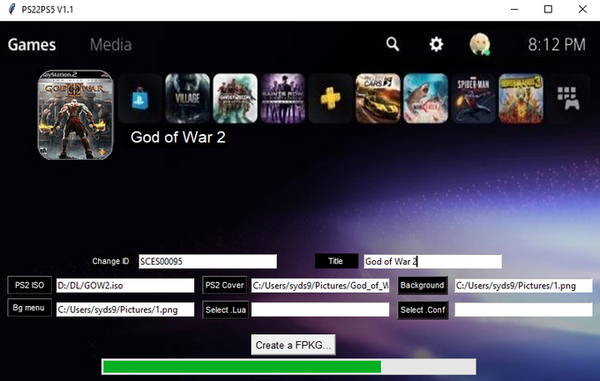
Kırık PS4 konsolunuzda PS2 oyunlarını oynayabilmeniz için yeni bir rehber hazırladım, daha önce forum sitemizde verdiğimiz rehber biraz uğraştırıcı idi, bu yeni rehberimizle PS2 oyunlarını PS4 formatına daha kolay bir şekilde convert edip PS4 konsolunuza yükleyip oynayabilirsiniz

Öncelikle aşağıdaki bağlantıdan gerekli programı indirip bilgisayarınıza yükleyiniz

DOWNLOAD
[Gizli içerik]

İndirmiş olduğunuz convert programını bilgisayarınıza yükledikten sonra çalıştırınız

Karşınıza gelen ekranda ISO sekmesine tıklayarak açılan pencereden convert etmek istediğiniz PS2 oyununu seçin


Title: sekmesine gelip convert edeceğiniz oyuna isim veriniz, istediğiniz bir isim yazabilirsiniz


Şimdi oyunumuza ikon ve arka plan ekleyelim

unity ikonu üzerine sağ tıklayın, Change icon 'u seçin ve oyuna ait ikon resmini seçin,ikon resmi 512x512 olmak zorundadır

Tekrar unity ikonu üzerine sağ tıklayın ve Change Backgraund ' seçin ve oyuna ait arka plan resmini seçin, backgraund resmi 1920x1080 olmak zorundadır

Resimleri seçtikten sonra Create PS2 Classic sekmesine tıklayın ve açılan pencerede convert edeceğiniz oyunun nereye kayıt edileceğiniz seçin ve tamam sekmesine tıklayın


Şimdi geriye yaslanın ve işlemin bitmesini bekleyin, işlem süresi convert ettiğiniz oyunun dosya boyutuna ve bilgisayarınızın gücüne göre değişmektedir


Convert işlemi bittiği vakit oyunu PS4 oyunu yükler gibi yükleyin ve keyfini çıkartın, iyi oyunlar​
 

ef82

Aktif Üyemiz
Kayıtlı Üyemiz
Kas 27, 2025
126
25
28
Merhaba değerli üyelerimiz ve değerli misafirlerimiz

Kırık PS4 konsolunuzda PS2 oyunlarını oynayabilmeniz için yeni bir rehber hazırladım, daha önce forum sitemizde verdiğimiz rehber biraz uğraştırıcı idi, bu yeni rehberimizle PS2 oyunlarını PS4 formatına daha kolay bir şekilde convert edip PS4 konsolunuza yükleyip oynayabilirsiniz

Öncelikle aşağıdaki bağlantıdan gerekli programı indirip bilgisayarınıza yükleyiniz

DOWNLOAD
[Gizli içerik]

İndirmiş olduğunuz convert programını bilgisayarınıza yükledikten sonra çalıştırınız

Karşınıza gelen ekranda ISO sekmesine tıklayarak açılan pencereden convert etmek istediğiniz PS2 oyununu seçin


Title: sekmesine gelip convert edeceğiniz oyuna isim veriniz, istediğiniz bir isim yazabilirsiniz


Şimdi oyunumuza ikon ve arka plan ekleyelim

unity ikonu üzerine sağ tıklayın, Change icon 'u seçin ve oyuna ait ikon resmini seçin,ikon resmi 512x512 olmak zorundadır

Tekrar unity ikonu üzerine sağ tıklayın ve Change Backgraund ' seçin ve oyuna ait arka plan resmini seçin, backgraund resmi 1920x1080 olmak zorundadır

Resimleri seçtikten sonra Create PS2 Classic sekmesine tıklayın ve açılan pencerede convert edeceğiniz oyunun nereye kayıt edileceğiniz seçin ve tamam sekmesine tıklayın


Şimdi geriye yaslanın ve işlemin bitmesini bekleyin, işlem süresi convert ettiğiniz oyunun dosya boyutuna ve bilgisayarınızın gücüne göre değişmektedir


Convert işlemi bittiği vakit oyunu PS4 oyunu yükler gibi yükleyin ve keyfini çıkartın, iyi oyunlar​
TEŞEKÜRLER
 

ramos2496

Yeni Üyemiz
Kayıtlı Üyemiz
Ara 29, 2025
19
1
3
Hola queridos miembros y valiosos invitados.

He preparado una nueva guía para ayudarte a jugar juegos de PS2 en tu consola PS4 con jailbreak. La guía anterior que publicamos en nuestro foro era un poco más compleja; con esta nueva guía, podrás convertir juegos de PS2 al formato PS4, instalarlos en tu consola PS4 y jugarlos más fácilmente.

Primero, descargue e instale el programa necesario desde el siguiente enlace.

DESCARGAR
[Contenido oculto]

Después de instalar el programa convertidor que descargaste en tu computadora, ejecútalo.

En la pantalla que aparece, haz clic en la pestaña ISO y selecciona el juego de PS2 que deseas convertir en la ventana que se abre.


Vaya a la pestaña Título: y asígnele un nombre al juego que desea convertir; puede ingresar cualquier nombre que desee.


Ahora agreguemos íconos y fondos a nuestro juego.

Haz clic derecho en el ícono de Unity, selecciona "Cambiar ícono" y elige la imagen del ícono del juego. Esta debe tener 512x512 píxeles.

Haz clic derecho en el ícono de Unity de nuevo, selecciona " Cambiar fondo " y elige la imagen de fondo del juego. Esta debe tener una resolución de 1920x1080.

Después de seleccionar las imágenes, haz clic en la pestaña Crear PS2 Classic y, en la ventana que se abre, elige dónde quieres guardar el juego que estás convirtiendo y luego haz clic en Aceptar.


Ahora siéntate y espera a que finalice el proceso; el tiempo de procesamiento varía según el tamaño del archivo del juego que estás convirtiendo y la potencia de tu computadora.


Una vez finalizada la conversión , instala el juego como si fuera de PS4 y disfruta. ¡Que disfrutes jugando!​
[/CITA]
muchas gracias
 

Argemondius420

Yeni Üyemiz
Kayıtlı Üyemiz
Ocak 4, 2026
1
0
1
Hello dear members and valued guests.

I've prepared a new guide to help you play PS2 games on your jailbroken PS4 console. The previous guide we provided on our forum was a bit more complicated; with this new guide, you can more easily convert PS2 games to PS4 format, install them on your PS4 console, and play them.

First, download and install the necessary program from the link below.

DOWNLOAD
[Hidden content]

After installing the converter program you downloaded on your computer, run it.

On the screen that appears, click the ISO tab and select the PS2 game you want to convert from the window that opens.


Go to the Title: tab and give the game you want to convert a name; you can enter any name you want.


Now let's add icons and backgrounds to our game.

Right-click on the Unity icon, select Change icon , and choose the game's icon image. The icon image must be 512x512 pixels.

Right-click on the Unity icon again, select " Change Background, " and choose the game's background image. The background image must be 1920x1080 resolution.

After selecting the images, click on the Create PS2 Classic tab, and in the window that opens, choose where you want to save the game you are converting, then click OK.


Now sit back and wait for the process to finish; the processing time varies depending on the file size of the game you are converting and the power of your computer.


Once the conversion process is complete, install the game as you would a PS4 game and enjoy. Happy gaming!​
Nce
 
Üst