Merhaba değerli üyelerimiz ve değerli misafirlerimiz
Kırık PS4 konsolunuzda PS2 oyunlarını oynayabilmeniz için yeni bir rehber hazırladım, daha önce forum sitemizde verdiğimiz rehber biraz uğraştırıcı idi, bu yeni rehberimizle PS2 oyunlarını PS4 formatına daha kolay bir şekilde convert edip PS4 konsolunuza yükleyip oynayabilirsiniz
Öncelikle aşağıdaki bağlantıdan gerekli programı indirip bilgisayarınıza yükleyiniz
 [Gizli içerik]
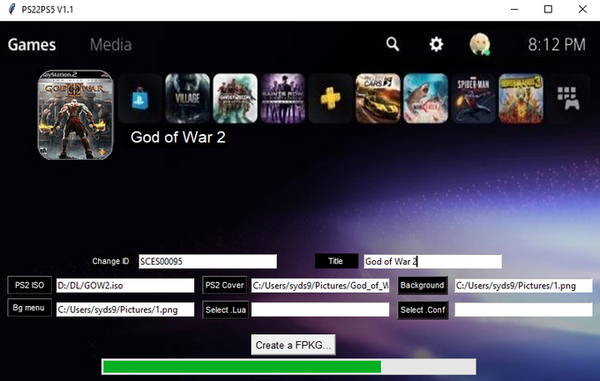
İndirmiş olduğunuz convert programını bilgisayarınıza yükledikten sonra çalıştırınız
Karşınıza gelen ekranda ISO sekmesine tıklayarak açılan pencereden convert etmek istediğiniz PS2 oyununu seçin
Title: sekmesine gelip convert edeceğiniz oyuna isim veriniz, istediğiniz bir isim yazabilirsiniz
Now let's add icons and background to our game
right click on the Unity icon,
Change icon Select and select the icon image for the game, the icon image must be 512x512
Right click on the unity icon again and
Change Backgraund Select ' and select the background image for the game, the background image must be 1920x1080
After selecting the pictures
Create PS2 Classic click on the tab and in the window that opens, select where to register for the game you will convert and click on the OK tab
Now sit back and wait for the process to finish, processing time varies depending on the file size of the game you convert and the power of your computer
Convert when the process is finished, install the game as if you were installing a PS4 game and enjoy it, have fun playing games