Hello, our valued members and valued guests.
I have prepared a new guide for you to play PS2 games on your broken PS4 console. The guide we previously gave on our forum site was a bit challenging. With this new guide, you can convert PS2 games to PS4 format more easily, install them on your PS4 console and play them.
First, download the necessary program from the link below and install it on your computer.
[Hidden content]
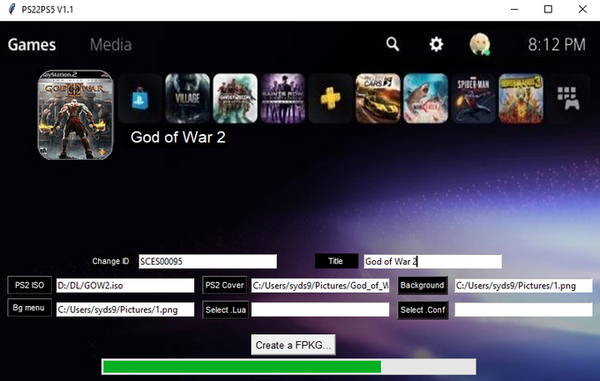
Run the convert program you downloaded after installing it on your computer.
Click on the ISO tab on the screen that appears and select the PS2 game you want to convert from the window that opens.
Go to the Title: tab and name the game you will convert, you can write any name you want.
Now let's add icons and background to our game.
Right click on the unity icon, select
Change icon and select the icon image of the game, the icon image must be 512x512.
Right click on the unity icon again and select
Change Background and select the background image of the game, the background image must be 1920x1080.
After selecting the images, click on
the Create PS2 Classic tab and in the window that opens, choose where to save the game you will convert and click on the OK tab.
Now sit back and wait for the process to finish, the processing time varies depending on the file size of the game you are converting and the power of your computer.
When the conversion process is completed, install the game as if you were installing a PS4 game and enjoy, enjoy the game.