- Eyl 10, 2020
- 19
- 6
- 3
[QUOTE = "mctuna, post: 642517, member: 2"]
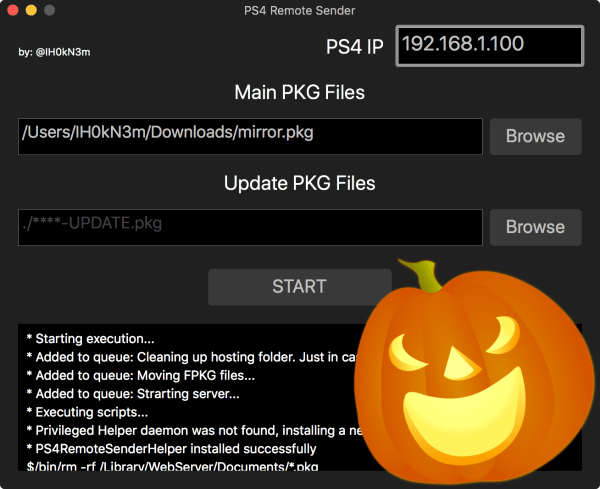
This tutorial and program is for computers using macOS for now, I will share the windows version soon friends
With this method, you can install PKG games and applications on your PS4 console via PC without using an external HDD.
USE
First, make sure that your PC and PS4 console are connected to the same internet network, then you can start the process.
Download and install the following pkg file on your PS4 Console and run it, it should stay open, do not close the program

[Hidden content] [Hidden content]
Install and run the program on your macOS PC
Type the IP address of your PS4 console in the tab that says PS4 IP on the screen that appears.
Main PKG Files tab Click Browser tab, select PKG file you want to upload
If you want to upload an update file for the game, click the Update PKG Files Browse tab and select your update file.
Now everything is ready Click on START tab and wait for your game to load on your PS4 console
[Hidden content][/ QUOTE]
Thank you
This tutorial and program is for computers using macOS for now, I will share the windows version soon friends
With this method, you can install PKG games and applications on your PS4 console via PC without using an external HDD.
USE
First, make sure that your PC and PS4 console are connected to the same internet network, then you can start the process.
Download and install the following pkg file on your PS4 Console and run it, it should stay open, do not close the program
[Hidden content] [Hidden content]
Install and run the program on your macOS PC
Type the IP address of your PS4 console in the tab that says PS4 IP on the screen that appears.
Main PKG Files tab Click Browser tab, select PKG file you want to upload
If you want to upload an update file for the game, click the Update PKG Files Browse tab and select your update file.
Now everything is ready
Click on START tab and wait for your game to load on your PS4 console[Hidden content]
Thank you