PS5 APPP PS5 MAcheteSVG Yayımlandı Save Manager

Bu Konu Sayfasındaki Bilgiler

Konu Hakkında Merhaba, tarihinde PS5 Apps + PC Tools kategorisinde mctuna tarafından oluşturulan PS5 MAcheteSVG Yayımlandı Save Manager başlıklı konuyu okuyorsunuz. Bu konu şimdiye dek 1,760 kez görüntülenmiş, 68 yorum ve 44 tepki puanı almıştır...
Kategori Adı PS5 Apps + PC Tools
Konu Başlığı PS5 MAcheteSVG Yayımlandı Save Manager
Konbuyu başlatan mctuna
Başlangıç tarihi
Cevaplar
Görüntüleme
İlk mesaj tepki puanı
Son Mesaj Yazan Aeserion

Adem oztımur

Aktif Üyemiz
Kayıtlı Üyemiz
Ara 6, 2021
405
112
43
Kullanıp videosu gelmeden pek anlaşılmaz kadro guncellemesi yapmaya çalıştım ama dosyalar aynı değil bunun çıkardığı yedek dosya formatı farkli
 

Aybata_27

Üyemiz
Kayıtlı Üyemiz
Eki 3, 2026
31
1
8


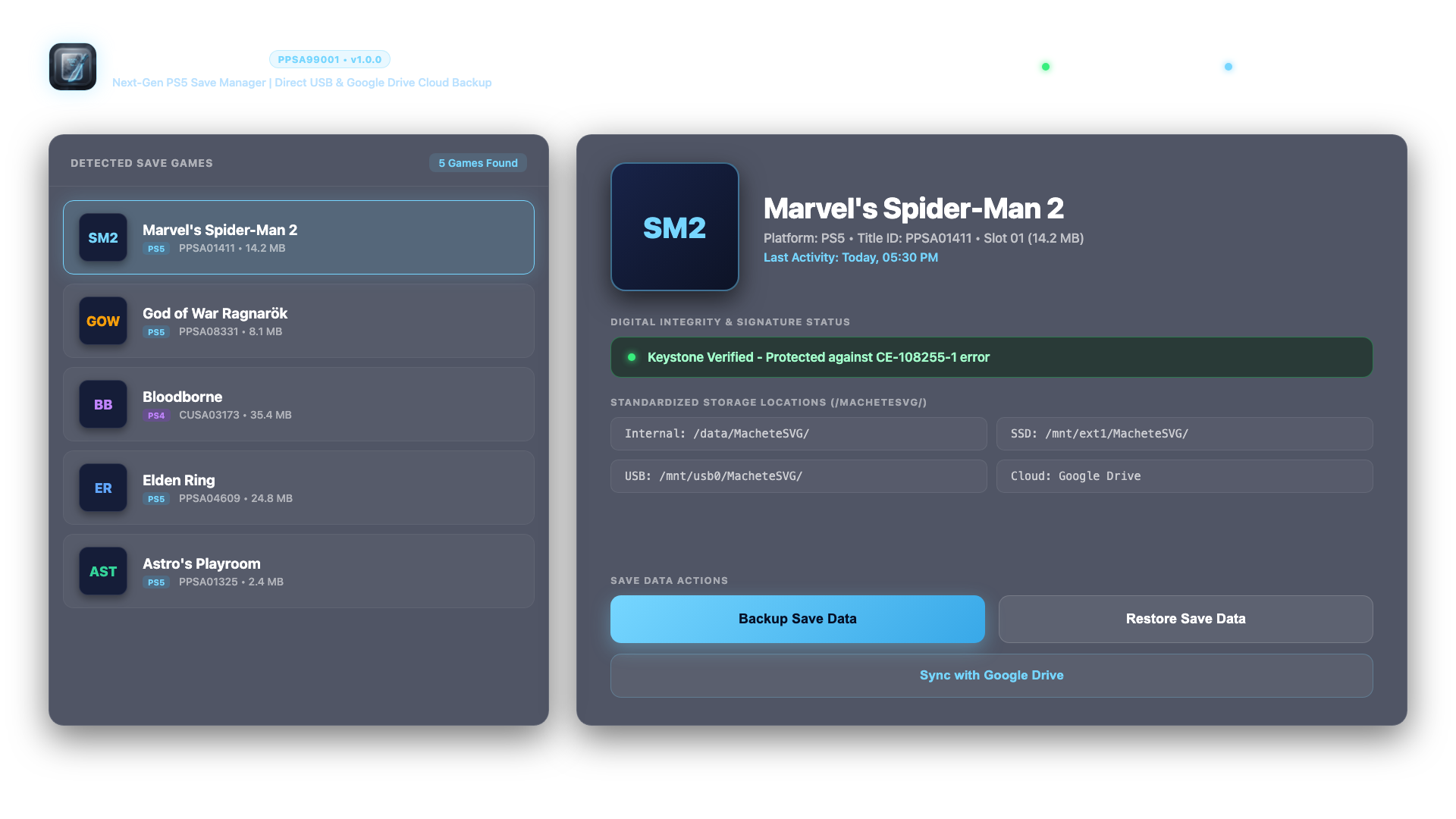
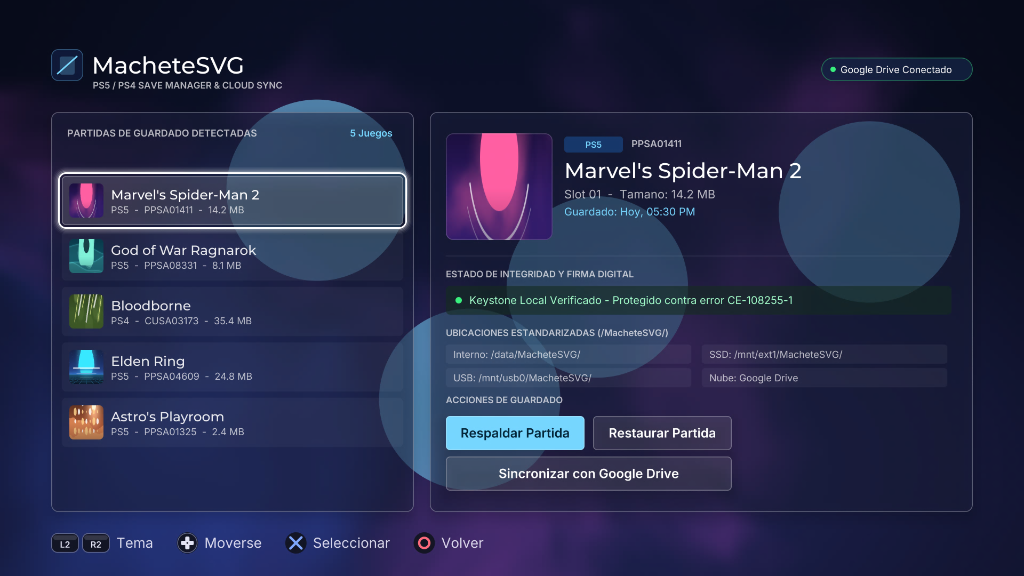
Uygulama ile oyunlarınızın kayıt dosyalarını yedekleyebilir ve geri yükleyebilirsiniz

FC 27 de transferler için henüz denemedim deneyen arkadaşlarımız olur ise bilgi verirlerse bilgilendirmeyi ilk mesaja ekleyeceğiz

DOWNLOAD
[Gizli içerik]

INSTALLATION INSTRUCTIONS:
METHOD 1: VIA FTP (Recommended)
1. Ensure your PS5 and computer are connected to the same local network.
2. Enable FTP server on your PS5 (e.g., via OnionHEN / etaHEN settings).
3. Connect using an FTP client (FileZilla, WinSCP, Cyberduck, etc.).
4. Upload the entire "PPSA99001" folder to:
/data/homebrew/
The resulting path must be:
/data/homebrew/PPSA99001/eboot.bin
5. Refresh your homebrew launcher (Itemzflow, ProsperoStore, or system menu).

METHOD 2: VIA USB DRIVE (exFAT)
1. Copy the "PPSA99001" folder to the root of an exFAT-formatted USB drive.
2. Insert the USB drive into your PS5.
3. Using a file manager (PS5-Explorer or Itemzflow), copy "PPSA99001" to /data/homebrew/.

CONTROLLER SHORTCUTS:
- D-Pad: Navigate game list and menus
- Cross (X): Select / Confirm action
- Circle (O): Cancel / Back
- Triangle: Open Google Drive Cloud synchronization directly
- Square: Refresh games list and connected USB devices
- L3 (Left Stick Click): Switch language (English / Spanish) in real-time​
Teşekkürler
 

volkangorunmez

Üyemiz
Kayıtlı Üyemiz
Ocak 6, 2020
76
4
8


Uygulama ile oyunlarınızın kayıt dosyalarını yedekleyebilir ve geri yükleyebilirsiniz

FC 27 de transferler için henüz denemedim deneyen arkadaşlarımız olur ise bilgi verirlerse bilgilendirmeyi ilk mesaja ekleyeceğiz

DOWNLOAD
[Gizli içerik]

INSTALLATION INSTRUCTIONS:
METHOD 1: VIA FTP (Recommended)
1. Ensure your PS5 and computer are connected to the same local network.
2. Enable FTP server on your PS5 (e.g., via OnionHEN / etaHEN settings).
3. Connect using an FTP client (FileZilla, WinSCP, Cyberduck, etc.).
4. Upload the entire "PPSA99001" folder to:
/data/homebrew/
The resulting path must be:
/data/homebrew/PPSA99001/eboot.bin
5. Refresh your homebrew launcher (Itemzflow, ProsperoStore, or system menu).

METHOD 2: VIA USB DRIVE (exFAT)
1. Copy the "PPSA99001" folder to the root of an exFAT-formatted USB drive.
2. Insert the USB drive into your PS5.
3. Using a file manager (PS5-Explorer or Itemzflow), copy "PPSA99001" to /data/homebrew/.

CONTROLLER SHORTCUTS:
- D-Pad: Navigate game list and menus
- Cross (X): Select / Confirm action
- Circle (O): Cancel / Back
- Triangle: Open Google Drive Cloud synchronization directly
- Square: Refresh games list and connected USB devices
- L3 (Left Stick Click): Switch language (English / Spanish) in real-time​
çok teşekkürler
 

mcfirtina

Kayıtlı Üye
Kayıtlı Üyemiz
Ağu 31, 2011
162
26
28
33


Uygulama ile oyunlarınızın kayıt dosyalarını yedekleyebilir ve geri yükleyebilirsiniz

FC 27 de transferler için henüz denemedim deneyen arkadaşlarımız olur ise bilgi verirlerse bilgilendirmeyi ilk mesaja ekleyeceğiz

DOWNLOAD
[Gizli içerik]

INSTALLATION INSTRUCTIONS:
METHOD 1: VIA FTP (Recommended)
1. Ensure your PS5 and computer are connected to the same local network.
2. Enable FTP server on your PS5 (e.g., via OnionHEN / etaHEN settings).
3. Connect using an FTP client (FileZilla, WinSCP, Cyberduck, etc.).
4. Upload the entire "PPSA99001" folder to:
/data/homebrew/
The resulting path must be:
/data/homebrew/PPSA99001/eboot.bin
5. Refresh your homebrew launcher (Itemzflow, ProsperoStore, or system menu).

METHOD 2: VIA USB DRIVE (exFAT)
1. Copy the "PPSA99001" folder to the root of an exFAT-formatted USB drive.
2. Insert the USB drive into your PS5.
3. Using a file manager (PS5-Explorer or Itemzflow), copy "PPSA99001" to /data/homebrew/.

CONTROLLER SHORTCUTS:
- D-Pad: Navigate game list and menus
- Cross (X): Select / Confirm action
- Circle (O): Cancel / Back
- Triangle: Open Google Drive Cloud synchronization directly
- Square: Refresh games list and connected USB devices
- L3 (Left Stick Click): Switch language (English / Spanish) in real-time​
teşekkürler
 
Üst